
Back in 2016 and then in 2020 I described how to get an A+ score with your TLS config.
That was 5 years ago. Since then OpenSSL and Apache have both advanced and there’s even more options than before. Nicely OpenSSL can now also use the official TLS names for ciphers, so we don’t need to keep switching between entries reported by Qualys SSL Labs and the OpenSSL internal names.
I’m also migrating to Debian, which has some differences.
Since we’re at it, we can also set security headers and make sure we have a proper CAA DNS entry set.
Support RSA and ECDSA certificates
In 2021 I described how to configure apache to support modern certificates based on elliptical curves, as well as traditional RSA certificates. That blog entry also describes how I use Dehydrated to get these certs from LetsEncrypt. With newer versions of Apache (eg RedHat 8 onwards, or Debian) we can specify this pretty easily; e.g.
	SSLCertificateFile /etc/apache2/SSL/sweharris/fullchain.pem
	SSLCertificateKeyFile /etc/apache2/SSL/sweharris/privkey.pem

	SSLCertificateFile /etc/apache2/SSL/sweharris_ecdsa/fullchain.pem
	SSLCertificateKeyFile /etc/apache2/SSL/sweharris_ecdsa/privkey.pem
Debian Ciphers Out Of The Box
The default configuration for Debian is SSLCipherSuite HIGH:!aNULL. You
might think that’s good. Unfortunately it’s not. Reading the openssl-ciphers(1) manual page we see
HIGH - “High” encryption cipher suites. This currently means those with key lengths larger than 128 bits, and some cipher suites with 128-bit keys.
This setting results in a B grade by SSL Labs because a number of those ciphers do not include “forward secrecy”. Forward secrecy (FS) is very much a nice thing to have; it means that if your private key ever leaks then it can not be used to decrypt old saved traffic logs (which is what “harvest now, decrypt later” type attacks try to do; save your data now, decrypt it in the future). After all, key management is one of the hardest parts of encryption!
So what OpenSSL means by “HIGH” is simply the bit strength.
Debian also defaults to a complicated protocol list; SSLProtocol all
-SSLv2 -SSLv3 -TLSv1 -TLSv1.1. The practical result of this is versions
1.2 and 1.3 are supported. I’m guessing it’s written this way so that if
a mythical 1.4 was ever supported then this line wouldn’t need changing.
Remove all the non-FS ciphers
Fortunately the SSL Labs results page can be used to get a list of all the ciphers that were supported by the default configuration and it flags those that provide FS. A bit of cut’n’paste and editing resulted in this list:
	TLS_AES_128_GCM_SHA256
	TLS_AES_256_GCM_SHA384
	TLS_CHACHA20_POLY1305_SHA256
	TLS_DHE_RSA_WITH_AES_128_GCM_SHA256
	TLS_ECDHE_ECDSA_WITH_AES_128_GCM_SHA256
	TLS_ECDHE_RSA_WITH_AES_128_GCM_SHA256
	TLS_DHE_RSA_WITH_ARIA_128_GCM_SHA256
	TLS_ECDHE_ECDSA_WITH_ARIA_128_GCM_SHA256
	TLS_ECDHE_RSA_WITH_ARIA_128_GCM_SHA256
	TLS_DHE_RSA_WITH_AES_128_CCM
	TLS_ECDHE_ECDSA_WITH_AES_128_CCM
	TLS_DHE_RSA_WITH_AES_256_GCM_SHA384
	TLS_ECDHE_ECDSA_WITH_AES_256_GCM_SHA384
	TLS_ECDHE_RSA_WITH_AES_256_GCM_SHA384
	TLS_DHE_RSA_WITH_ARIA_256_GCM_SHA384
	TLS_ECDHE_ECDSA_WITH_ARIA_256_GCM_SHA384
	TLS_ECDHE_RSA_WITH_ARIA_256_GCM_SHA384
	TLS_DHE_RSA_WITH_AES_256_CCM
	TLS_ECDHE_ECDSA_WITH_AES_256_CCM
	TLS_ECDHE_RSA_WITH_CHACHA20_POLY1305_SHA256
	TLS_ECDHE_ECDSA_WITH_CHACHA20_POLY1305_SHA256
	TLS_DHE_RSA_WITH_CHACHA20_POLY1305_SHA256
Unfortunately it doesn’t seem as if OpenSSL has a short-cut for these
“FS” ciphers, so we have to list each one separately on the SSLCipherSuite
line.
We need CBC as well
As in 2020, this still results in some older software being unable to negotiate a cipher, even though they support TLS1.2. SSL Labs still flags CBC ciphers as weak, but it doesn’t reduce the score. So let’s add these two in:
	TLS_ECDHE_RSA_WITH_AES_128_CBC_SHA256
	TLS_ECDHE_RSA_WITH_AES_256_CBC_SHA384
Is this too much?
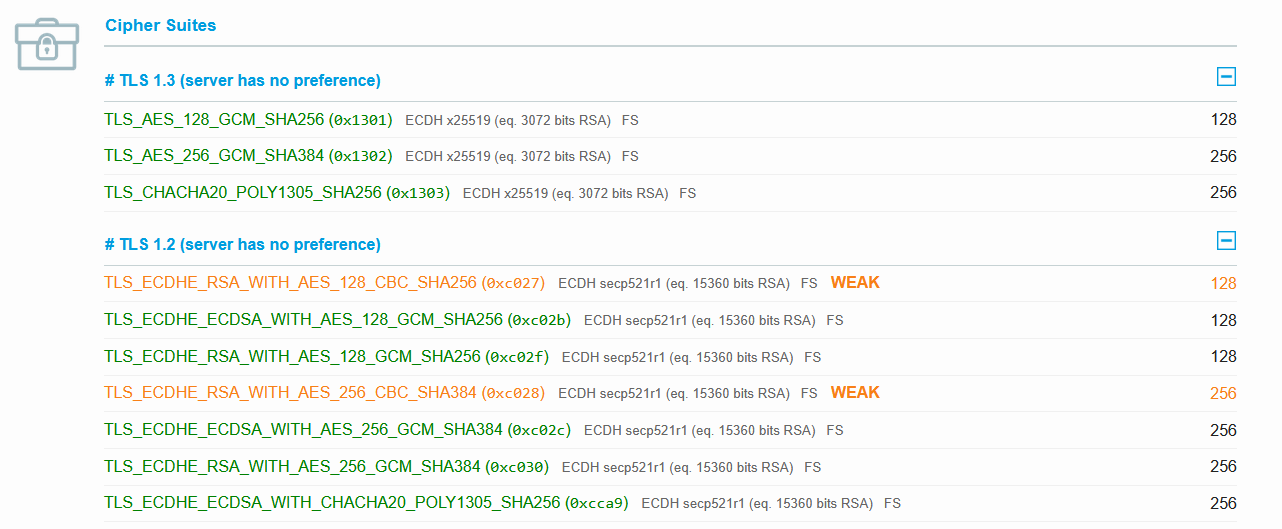
What I noticed in the results was that although we offer every cipher, all the simulations provided by the SSL Labs tester ended up only using a subset of them! So we could provide a small list of ciphers
	TLS_AES_128_GCM_SHA256
	TLS_AES_256_GCM_SHA384
	TLS_CHACHA20_POLY1305_SHA256
	TLS_ECDHE_ECDSA_WITH_AES_128_GCM_SHA256
	TLS_ECDHE_ECDSA_WITH_AES_256_GCM_SHA384
	TLS_ECDHE_ECDSA_WITH_CHACHA20_POLY1305_SHA256
	TLS_ECDHE_RSA_WITH_AES_128_GCM_SHA256
	TLS_ECDHE_RSA_WITH_AES_256_GCM_SHA384
	TLS_ECDHE_RSA_WITH_AES_128_CBC_SHA256
	TLS_ECDHE_RSA_WITH_AES_256_CBC_SHA384
This is shorter and so may (especially on TLS1.2) result in smaller packets. The downside is that an odd client may need one of the other ones.
But with this configuration, we get the following results:
SSLCipherSuite TLS_AES_128_GCM_SHA256:TLS_AES_256_GCM_SHA384:TLS_CHACHA20_POLY1305_SHA256:TLS_ECDHE_ECDSA_WITH_AES_128_GCM_SHA256:TLS_ECDHE_ECDSA_WITH_AES_256_GCM_SHA384:TLS_ECDHE_ECDSA_WITH_CHACHA20_POLY1305_SHA256:TLS_ECDHE_RSA_WITH_AES_128_GCM_SHA256:TLS_ECDHE_RSA_WITH_AES_256_GCM_SHA384:TLS_ECDHE_RSA_WITH_AES_128_CBC_SHA256:TLS_ECDHE_RSA_WITH_AES_256_CBC_SHA384
HSTS and other headers
To round this off we need to specify strict transport security headers.
Header set Strict-Transport-Security "max-age=31536000; includeSubDomains"
While we are here we can also add some other good and useful security headers.
I consider these to be a good default, but you might have different needs.
	ServerSignature off
	ServerTokens Prod

	Header set X-Content-Type-Options "nosniff"
	Header set X-XSS-Protection "1; mode=block"
	Header set X-Frame-Options "SAMEORIGIN"
	Header set Referrer-Policy "no-referrer"
	Header set Permissions-Policy: interest-cohort=()
	Header set Content-Security-Policy: script-src 'self'
The Content-Security-Policy entry is very likely to need to be customised for your site; e.g. if you include fonts from Google you’d need to include those here. Check out Scott Helme’s description for an introduction to CSP.
And a Security Headers scan nicely returns an “A” score with that setup.
Restricting what CAs can be used
A well behaved Certificate Authority will check to see if the requested domain has a Certificate Authority Authorization (CAA) policy defined and, if one is found, will only issue certificates if permitted. This is set in DNS. Since I use LetsEncrypt I have a simple policy:
@ IN CAA 0 issue "letsencrypt.org"
HTTP/2 support
This isn’t really needed but it might be useful to set up. It can
speed up traffic and reduce overhead with TLS1.2. With Debian it’s as
simple as doing a a2enmod http2. On RedHat systems you may need to
dnf install mod_http2 first.
The result
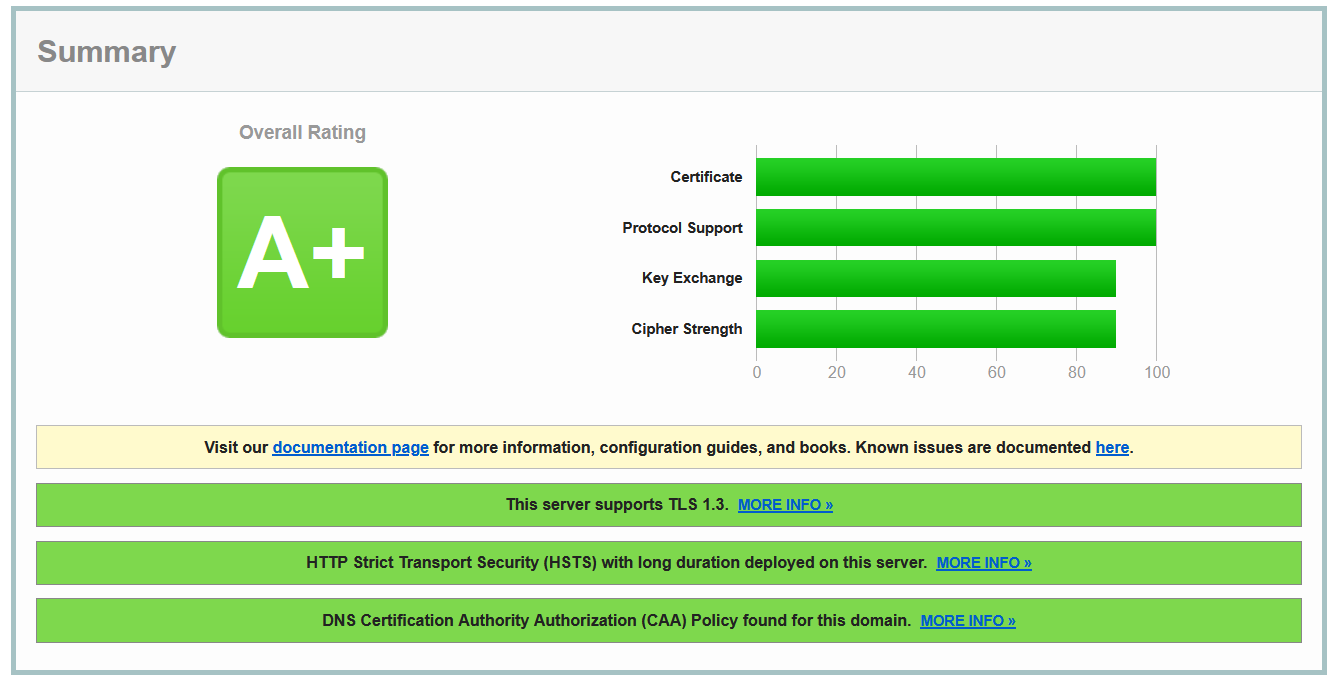
And all the clients that support TLS1.2 or TLS1.3 and are simulated by SSL Labs connect cleanly.