
In December I documented TLS settings for Debian 13. These settings gave us TLS1.3, the ability to use ECDSA, backwards compatibility with some older software, and an A+ rating in SSL Labs.
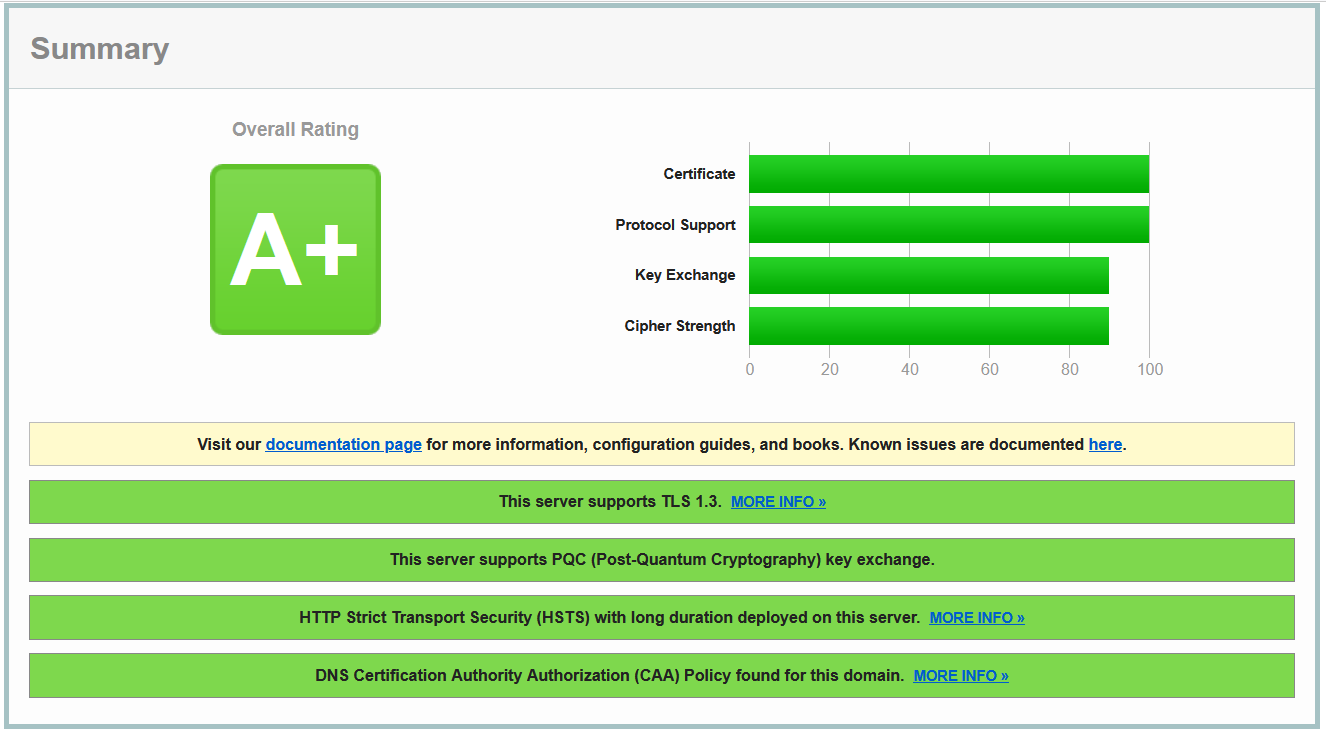
Last week I re-ran the tests and noticed an additional flag had been added; “This server supports PQC (Post-Quantum Cryptography) key exchange.”
So I thought I’d summarize all the previous posts into a single one and describe my setup. There’s not really any new information here, but it means you don’t have to go back through 4 or 5 other posts to get the same stuff!
My Setup
For various complicated reasons I don’t use certbot to get my certificates
from LetsEncrypt. Instead I use a shell
script called Dehydrated.
This can do http-01 or dns-01 challenges (in my case I use dns) and
retrieve the certificates to a local file. From there I use ansible to
deploy them (web servers, SMTP, IMAP, NNTP, MQTT,… lots of places across
multiple machines!)
Getting RSA and ECDSA certs from LetsEncrypt
I want to use both RSA and ECDSA certificates on this site but Dehydrated can only handle one type at a time. Fortunately it has a work around; you can create a second certificate directory and have that override the cert type.
So in my case I configured the app to default to rsa and then created
an override.
   % cat domains.txt
   *.sweharris.org sweharris.org > sweharris
   *.sweharris.org sweharris.org > sweharris_ecdsa

   % grep KEY_ALGO config
   KEY_ALGO=rsa

   % cat certs/sweharris_ecdsa/config
   KEY_ALGO="secp384r1"
Yes, I use a wildcard cert; it’s easier than managing a SAN entry of a dozen entries and then have to regenerate a new cert each time I add a new machine!
With this setup when I run the “refresh” command (dehydrated -c) it
will place the RSA cert in the sweharris directory and ECDSA cert in
the sweharris_ecdsa directory:
   % openssl x509 -noout -text -in certs/sweharris/cert.pem | grep Public.Key.Algo
               Public Key Algorithm: rsaEncryption

   % openssl x509 -noout -text -in certs/sweharris_ecdsa/cert.pem | grep Public.Key.Algo
               Public Key Algorithm: id-ecPublicKey
Inside the certs directory we will find four files of interest. These
are always symbolic links to the latest version, so that provides a
consistent name for us to use:
- cert.pem
This is the public key for the server certificate - privkey.pem
This is the private key for the server. - chain.pem
This file contains the “chaining” certificates needed to generate a chain of trust to the root. - fullchain.pem
This file contains the chaining certificates and the server public key. Sometimes this can be easier to use.
We will use the fullchain and privkey files with Apache.
Configuring apache
Debian 13 comes with Apache/2.4.67 and OpenSSL 3.5.6. This supports TLS1.3.
I enabled the default-ssl site but commented out the
SSLCertificateFile and SSLCertificateKeyFile lines. This is probably
not necessary but it works :-)
TLS settings
I put the TLS settings in a conf-enabled file, at the top level, not
restricted to a virtual host. In this way every vhost gets the same
certificates and same ciphers.
SSLCertificateFile /etc/apache2/SSL/sweharris/fullchain.pem
SSLCertificateKeyFile /etc/apache2/SSL/sweharris/privkey.pem

SSLCertificateFile /etc/apache2/SSL/sweharris_ecdsa/fullchain.pem
SSLCertificateKeyFile /etc/apache2/SSL/sweharris_ecdsa/privkey.pem

SSLCipherSuite TLS_AES_128_GCM_SHA256:TLS_AES_256_GCM_SHA384:TLS_CHACHA20_POLY1305_SHA256:TLS_ECDHE_ECDSA_WITH_AES_128_GCM_SHA256:TLS_ECDHE_ECDSA_WITH_AES_256_GCM_SHA384:TLS_ECDHE_ECDSA_WITH_CHACHA20_POLY1305_SHA256:TLS_ECDHE_RSA_WITH_AES_128_GCM_SHA256:TLS_ECDHE_RSA_WITH_AES_256_GCM_SHA384:TLS_ECDHE_RSA_WITH_AES_128_CBC_SHA256:TLS_ECDHE_RSA_WITH_AES_256_CBC_SHA384
Why those ciphers?
I go into more details in my previous posts (here and here) but to summarize:
These four are the only “fully” safe ones to use with TLS1.2 with RSA:
  TLS_AES_128_GCM_SHA256
  TLS_AES_256_GCM_SHA384
  TLS_ECDHE_RSA_WITH_AES_128_GCM_SHA256
  TLS_ECDHE_RSA_WITH_AES_256_GCM_SHA384
And a couple to enable ECDSA:
  TLS_ECDHE_ECDSA_WITH_AES_128_GCM_SHA256
  TLS_ECDHE_ECDSA_WITH_AES_256_GCM_SHA384
Unfortunately this will stop a few machines from connecting, so we add a couple of theoretically weak CBC ciphers:
  TLS_ECDHE_RSA_WITH_AES_128_CBC_SHA256
  TLS_ECDHE_RSA_WITH_AES_256_CBC_SHA384
And then we get a couple of nice new ones:
  TLS_CHACHA20_POLY1305_SHA256
  TLS_ECDHE_ECDSA_WITH_CHACHA20_POLY1305_SHA256
Virtual host settings
The virtual host setting is pretty generic; it’s pretty much the same as you’d set up for any virtual host.
<VirtualHost _default_:443>
  SSLEngine On
  ServerName mytesthost.sweharris.org
  ServerAlias mytesthost.sweharris.org

  DocumentRoot /var/www/ssl-docs
  <Location />
    Options +Indexes
  </Location>

  <Directory "/var/www/ssl-docs">
    Options Indexes
    Require all granted
  </Directory>

  ErrorLog ${APACHE_LOG_DIR}/ssl_error_log
  CustomLog ${APACHE_LOG_DIR}/ssl_access_log combined
  LogLevel warn
  CustomLog ${APACHE_LOG_DIR}/ssl_request_log \
          "%t %h %{SSL_PROTOCOL}x %{SSL_CIPHER}x \"%r\" %b"

</VirtualHost>
You can define multiple virtual hosts the same way. If you want the
vhosts to have different TLS settings then move the relevant lines
inside the VirtualHost setting. This may require replication of
configuration, but you get more flexibility that way.
Other settings
Since we’re building a good configuration we can also (in the conf-enabled
file) add a few more useful settings:
ServerSignature off
ServerTokens Prod

Header set Strict-Transport-Security "max-age=31536000; includeSubDomains"
Header set X-Content-Type-Options "nosniff"
Header set X-XSS-Protection "1; mode=block"
Header set X-Frame-Options "SAMEORIGIN"
Header set Referrer-Policy "no-referrer"
Header set Permissions-Policy: interest-cohort=()
Header set Content-Security-Policy: "script-src 'self'"
Some of these may definitely be VirtualHost specific in a larger environment, especially the Content-Security-Policy header!
Results.
An A+ rating
The first result is we get an A+ rating and supports PQC:
The Ciphers
The ciphers all support forward secrecy:
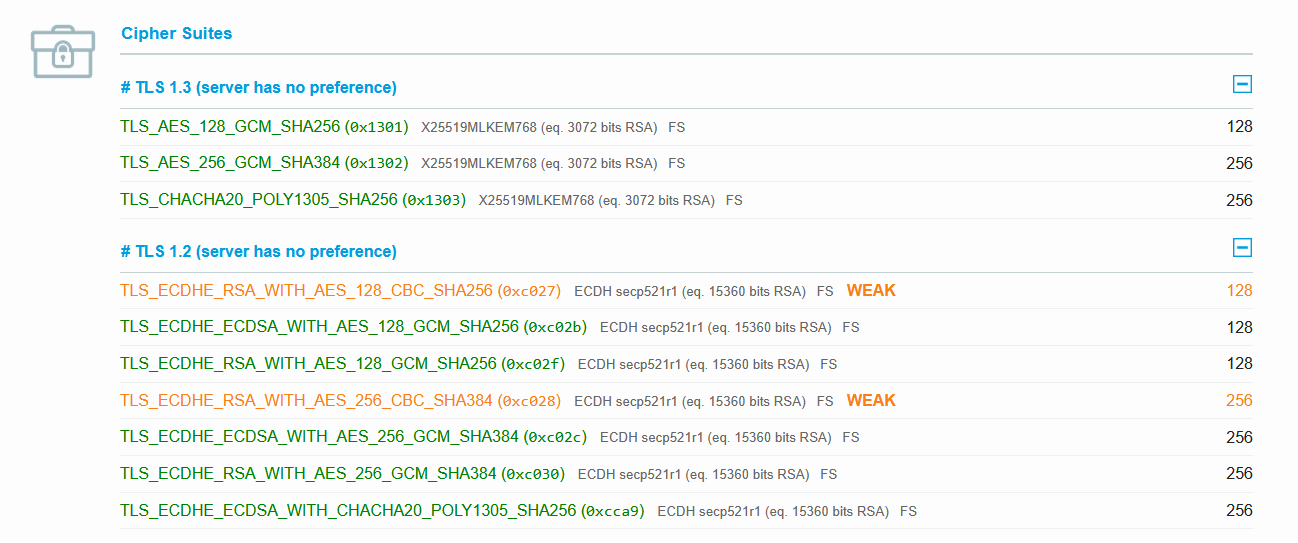
Notice the TLS1.3 ciphers have X25519MLKEM768 against them; these are
our post-quantum ciphers and are the hybrid of X25519 and ML-KEM-768
(aka Kyber-768). Now this is new; 6 months previously this configuration
only showed “ECDH x25519” as the cipher, so either openssl has improved
and I got those improvements as a Debian patch, or SSL Labs has improved
their detection (or both; could always be both!).
Weak CBC
We can see the two CBC ciphers have been marked as “Weak”. Now this is debatable. CBC isn’t necessarily weak, but it’s historically had a lot of bad implementations, leading to variations of POODLE attacks (amongst others). It’s was kinda expected that there will be yet another variation of POODLE on CBC, so SSLlabs flag these ciphers as weak, as an encouragement to move people off and onto stronger ciphers.
Without those two ciphers the following clients can’t negotiate nor talk to the server, and it’s been years since the last known attack on these ciphers, so I’m not concerned, and it doesn’t reduce the score and lets you support older clients (how many Java 8 apps are still out there? probably too many!)
    IE 11 / Win 7
    IE 11 / Win 8.1
    IE 11 / Win Phone 8.1
    IE 11 / Win Phone 8.1 Update
    Java 8u161
    Safari 6 / iOS 6.0.1
    Safari 7 / iOS 7.1
    Safari 7 / OS X 10.9
    Safari 8 / iOS 8.4
    Safari 8 / OS X 10.10
Security Headers
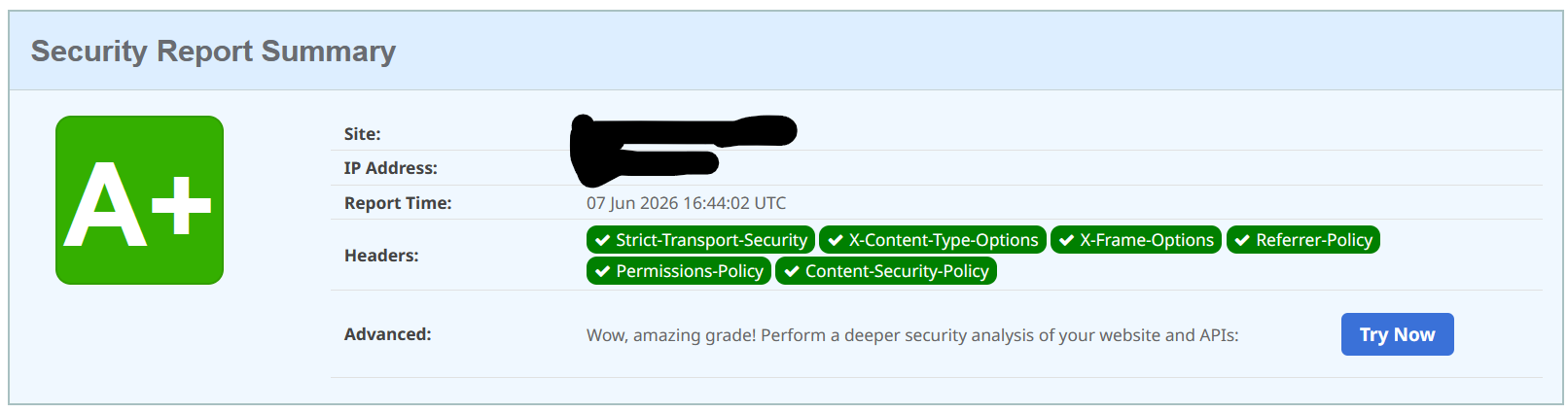
And, finally, the security headers score:
Summary
In theory I’m not really concerned about post-quantum. Definitely not for this site (I use TLS mostly for data integrity) but also in the wider cryptographic sense; IMHO practical useful quantum compute is still 20 years away, and has been for the past 20 years. I don’t see 2048 bit RSA from being broken in my lifetime.
BUT, and this is a big “but”, your customers might. So we need to understand how to do this properly.
Fortunately we kind of get this “for free” with a well configured server. I didn’t need to make any changes to my configuration in order to get this result.
The challenges, now, are client-side. According to the SSL Labs simulation the only clients currently supporting PQC are Chrome 131+, Firefox 135+, Edge 131+, and Opera 117+. It looks like we need the new Java 27, which is not yet on general release, to have support this cipher!